See the AI agents on your machine, and what they can reach.
Sonar maps the agents on a computer: what each one is talking to right now, the MCP servers, keys and credentials it could reach, and what agents did over the last 30 days. You get a grade and the fixes in order. It runs on your machine and sends nothing anywhere.
Sonar for Android
See the AI apps on this phone or tablet, how long you used each in the last 30 days, and which apps can act in other apps. Sonar has no network permission, so nothing it reads leaves the device.
Download Sonar for AndroidSonar isn't on Google Play yet. When you open the file, Android asks you to allow installs from your browser; allow it, then tap Install. Google Play Protect may check the app first. To see time used, turn on usage access when Sonar asks.
Your computer sees much more.
Sonar for iPhone and iPad
See the AI apps you used on this iPhone or iPad in the last four weeks, and for how long, from Screen Time. You allow it once, and nothing it reads leaves the device. It's coming to the App Store.
Your computer sees much more: the agents running, what they talk to, and the keys and files they can reach.
Managing your company's iPhones and iPads? The fleet report lists the AI apps Microsoft Intune sees on them.
Open Crawdad Sonar from your Downloads folder. It scans and opens your report in your browser.
Or in Terminal:
In PowerShell:
Or download it and double-click:
Download Sonar for WindowsOn a Windows PC with an ARM processor, download the ARM version.
In a terminal, on Intel or ARM:
Add sudo before sh to include other users' processes.
The Mac app is signed and notarized by Apple; the Windows program is signed by Crawdad Security, Inc. The command lines check each download against its published checksum before running it.
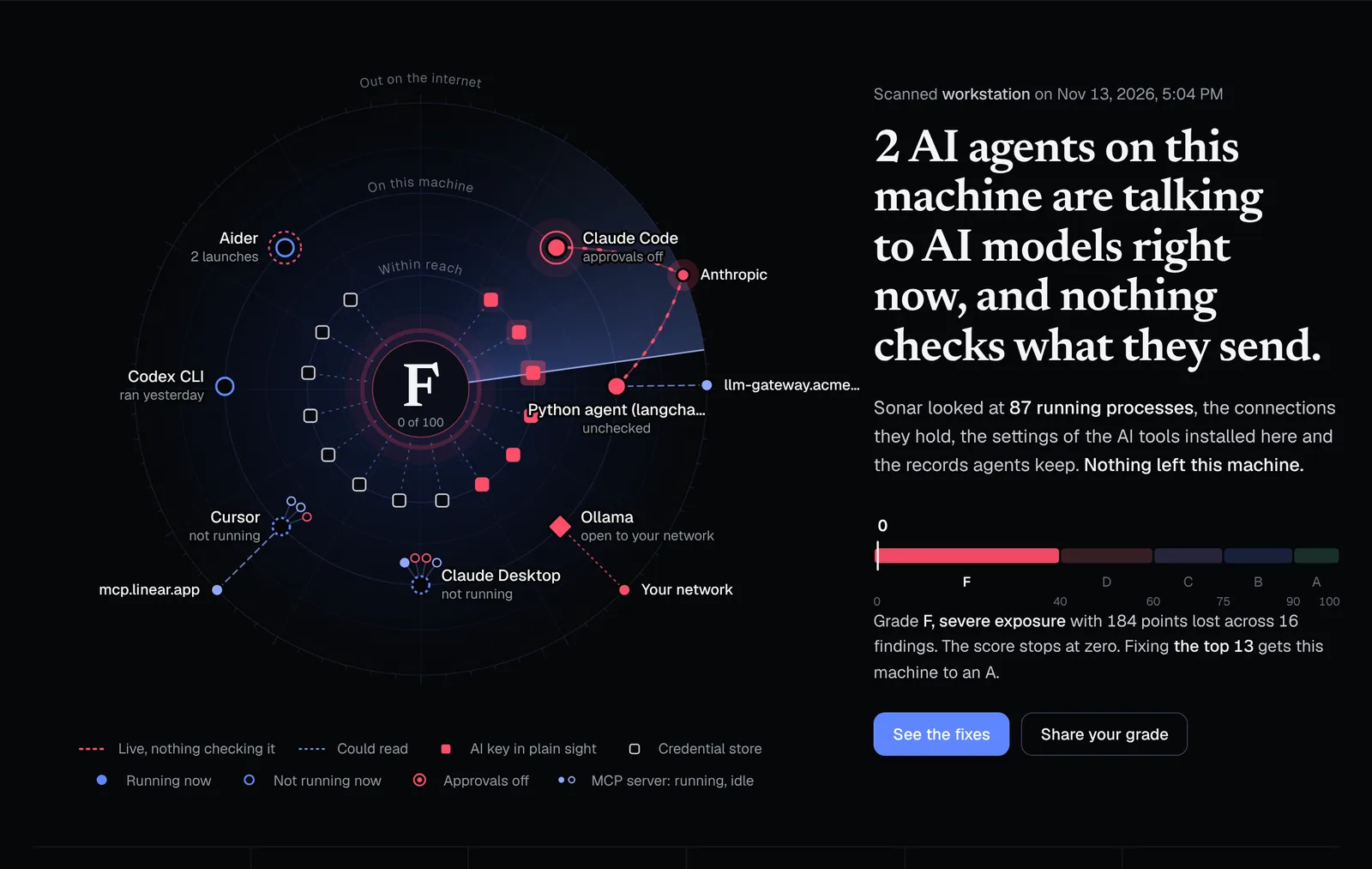
The agents you know about, and the ones you don't
Agents talking to models right now
Each process acting as an AI agent, the provider it is connected to at that moment, and whether anything checks that traffic. Agents running with approvals turned off are flagged, and so are AI tools signed in to a person's own account instead of the company's.
MCP servers and what they can touch
The MCP servers in Claude, Cursor, VS Code and other AI apps, and whether each can reach files, commands, browsers, databases or email. Keys left in configs and packages that download fresh code on every launch.
The last 30 days
From the records agents and your shell already keep: commands run, files changed, web requests, and launches with approvals off, day by day. Agents set to start on their own, and the AI sites opened in your browsers. What that use would cost at API prices, and what the AI plans you pay for cost a month.
Keys in plain sight
AI keys in shell files, .env files and tool configs, and in your shell's environment. Sonar says where a key is, never what it is.
What an agent could reach
SSH keys, cloud and Kubernetes credentials, registry and code-hosting tokens: what a misled agent running as you could read. Local model servers left open to the network.
A grade and the fixes in order
A score out of 100 and every fix with the points it's worth, so you know what to do first. Share your grade as an image, or as a link with the summary only.
Nothing leaves your machine
Sonar reads your processes, finds your keys and counts visits to AI sites in your browsers' history, so it is built so that nothing it sees can leave. There is no networking code in it that could send your results anywhere, and a test in the build fails if anyone adds one. Its only network activity is looking up the public addresses of AI providers, so it can tell which connections go to them.
Zero dependencies
One program built from Rust's standard library and nothing else.
No way to send
No HTTP client exists in it. A test fails the build if networking code is ever added.
Keys are never read out
It reports that a key exists and where. The value is never copied, stored, printed or sent.
A report that can't phone home
Your report is a file on your machine that blocks every network request. Sharing happens only if you choose it, and you see what's sent first.
Run it across every machine you manage
Collect each machine's results one of two ways, then put them together in the fleet report.
- With a remote-management tool: run the fleet script on every machine. Each one writes its results to a shared folder.
- Without one: each person runs Sonar, clicks Save this machine's results at the bottom of their report, and sends you the file.
Drop the files on the fleet report. You get every machine's grade, the problems across your clients, what to fix first, what their AI plans cost a month, what their AI use would cost at API prices and on another model, and each machine in detail. Add your name and logo, then print it, save it as a PDF or download it. It's built in your browser, and nothing is uploaded.
# one line of JSON per machine, grouped by client
crawdad-sonar --fleet --client "Client name"
# exit code 2 when anything is high or critical
crawdad-sonar --fleet --fail-on high
# the full report as JSON
crawdad-sonar --json
What Sonar can't see
Sonar finds agents by their live connections, their settings and the records they keep. It can miss an agent that isn't running and keeps no local records, one routing through a corporate proxy, or a provider it doesn't know yet. Run it with sudo or as administrator to include other users' processes. We'd rather you know the edges than trust a number that's quietly wrong.
That's the point.
Every agent Sonar finds is an open line to a model with nothing checking what it sends. Crawdad sits between your agents and the models they call, on each machine. For every agent that goes through it, it checks what is sent and stops keys and other credentials from leaving. Set to Enforce, it also holds risky commands for you to decide. See it on your own agents.