Getting started
Protect your AI agent in seconds. Pattern detection is active the moment the sidecar starts; enhanced ML detection downloads silently in the background. Raw prompts, responses, action parameters, and PII stay on your machine by default.
1 Install
curl -fsSL https://getcrawdad.dev/install.sh | sh
The script detects your platform, downloads the signed binary from the R2 CDN, installs it to /usr/local/bin/crawdad-sidecar, and registers the sidecar to run automatically:
Install is fast because only the binary is fetched. Pattern detection activates immediately. On first run the sidecar downloads the ML model and platform-specific libonnxruntime in the background, you'll see a one-line progress indicator in the dashboard. When it finishes, the dashboard shows "Full detection ready, restart to activate." The next restart (reboot, update, or manual) loads ML and full detection is live. The download runs exactly once per machine; subsequent starts use the on-disk model.
- macOS:
LaunchAgentat~/Library/LaunchAgents/com.crawdad.sidecar.plist - Linux:
systemdunit at/etc/systemd/system/crawdad-sidecar.service(prompts forsudo)
✓ Crawdad installed and protecting your agents, then Dashboard: http://localhost:7750. Want the full play-by-play for every platform (including Windows and the fleet console)? See the install guide.2 Point your agent at the proxy
The easiest path is the dashboard's Connect Agent screen: it discovers the agents already running on your machine and gives each routable tool a one-click Connect that writes the correct configuration for you and makes it persistent (a fenced # >>> crawdad >>> block in your shell rc, or a merged provider entry in ~/.codex/config.toml). It never edits a file silently — you see exactly what it will write, then confirm once. To do it by hand instead, set one environment variable per provider. No code changes required.
# Anthropic (Claude Code, Anthropic SDK) — NO /v1:
export ANTHROPIC_BASE_URL=http://localhost:7748

# OpenAI (SDK, OpenAI-compatible clients) — /v1 REQUIRED:
export OPENAI_BASE_URL=http://localhost:7747/v1

# Google (Gemini, Google ADK) — NO /v1:
export GOOGLE_API_ENDPOINT=http://localhost:7746

# xAI / Grok — /v1 REQUIRED:
export XAI_BASE_URL=http://localhost:7745/v1

# NVIDIA NIM — /v1 REQUIRED:
export NVIDIA_BASE_URL=http://localhost:7744/v1
Your agent still talks to the same SDK, same request and response format. Every request passes through the multi-layer detection pipeline before reaching the upstream model. Allowed requests are forwarded unchanged.
/v1 suffix matters. Anthropic and Google take no suffix (their SDKs append /v1/messages and /v1beta/... themselves). OpenAI, xAI, and NVIDIA require /v1 (their SDKs append /chat/completions, and the proxy only inspects /v1/chat/completions). Get the suffix wrong and the request still works but silently bypasses inspection. The Connect Agent screen always writes the correct suffix.Claude Code: export ANTHROPIC_BASE_URL=http://localhost:7748 in your shell (or add to ~/.zshrc / ~/.bashrc) and restart the terminal.
OpenAI Codex CLI: a bare OPENAI_BASE_URL does not route Codex — it reads its provider from ~/.codex/config.toml, not the environment. Add (or let Connect Agent merge in) a Crawdad provider:
model_provider        = "crawdad"
preferred_auth_method = "apikey"

[model_providers.crawdad]
name     = "Crawdad"
base_url = "http://localhost:7747/v1"
env_key  = "OPENAI_API_KEY"
wire_api = "chat"
3 Open the dashboard
open http://localhost:7750
You'll see overview cards (request counts, detection stats, red team trend), a Run Test Battery button that fires 24 curated adversarial payloads through the live pipeline, per-session timeline, agent and MCP inventory, and the audit trail. The Connect Agent screen discovers the agents already running on your machine and offers a one-click, consented, persistent Connect for each; the connection confirms the moment proxied traffic arrives.
4 Verify
Quickest check: the dashboard loads and clicking Run Test Battery returns a results table with blocks, allows, and per-layer decisions.
Command-line alternatives:
crawdad-sidecar --version            # prints the installed version
curl http://127.0.0.1:7749/v1/health  # internal control port
# {"status":"ok","device_id":"d_..."}
5 Set trust levels per agent
Open the Agents page in the dashboard. Every agent Crawdad has seen is listed with a colored trust level dot and a level selector:
| Level | Color | What it does |
|---|---|---|
| Autonomous | green | Full detection pipeline runs (L1–L6; L7 LLM-critic skipped for speed). No restrictions. Agent operates freely. |
| Monitored | yellow | Full L1–L7 pipeline. No restrictions by default. Default state for new agents. |
| Restricted | orange | Full pipeline plus per-tool-call restrictions. Default restrictions on entry: block Bash/shell, deny reads from /etc, ~/.ssh, ~/.aws, ~/.config. Customizable per-agent. |
| Quarantined | red | All requests from this agent return HTTP 403 before detection runs. Other agents on the same provider are unaffected. |
Each request is attributed to a specific agent at connection time by resolving the caller's TCP socket to its owning PID, walking up the parent process tree until a known agent signature matches. Enforcement is per-agent, quarantining one agent never blocks another on the same provider.
Detections automatically lower trust: an injection attempt on a Monitored agent escalates to Restricted; a second attempt or a critical-severity hit escalates to Quarantined. Quiet periods auto-recover one level at a time. Every transition is recorded in the audit trail with its trigger and whether it was manual or automatic. Escalation is configurable per-agent, including an off switch.
Modes: recording vs blocking
A fresh install is observe-first: Crawdad inspects and scores every call and records what it finds, but it does not block, and it makes no changes to your operating system. Two independent axes control that, both off by default:
- DetectionEnforcement —
Observe(record only) orEnforce(block on detection). Turn blocking on withcrawdad arm(off withcrawdad disarm) or from the dashboard's Protection Mode screen. - EnforcementMode —
Monitor(no OS changes) orEnforce(a persistent OS-level default-deny egress lock binds all agent egress to Crawdad).
The header mode pill tells you the honest posture at a glance and never shows green while recording-only: neutral Monitoring when it is recording, accent/green Enforcing once detections block. Clicking it opens the Protection Mode screen. Detection strictness presets (Maximum / Standard / Reduced / Paused) and per-layer sensitivity live in Settings; Paused keeps detection and audit running while suppressing blocking, useful when something legitimate is being blocked and you need to ship.
6 Connect your phone
Open Settings → Connect Device in the dashboard. A QR code appears; scan it from any phone browser. The pairing handshake exchanges device keys over your LAN, your phone and the sidecar need to be on the same WiFi for this one-time step. After pairing, the mobile app works from anywhere via the encrypted relay. If your desktop's LAN IP changes later (e.g. after a reboot), the phone races a 3-second direct probe and falls back to the encrypted relay automatically.
What you get on the phone:
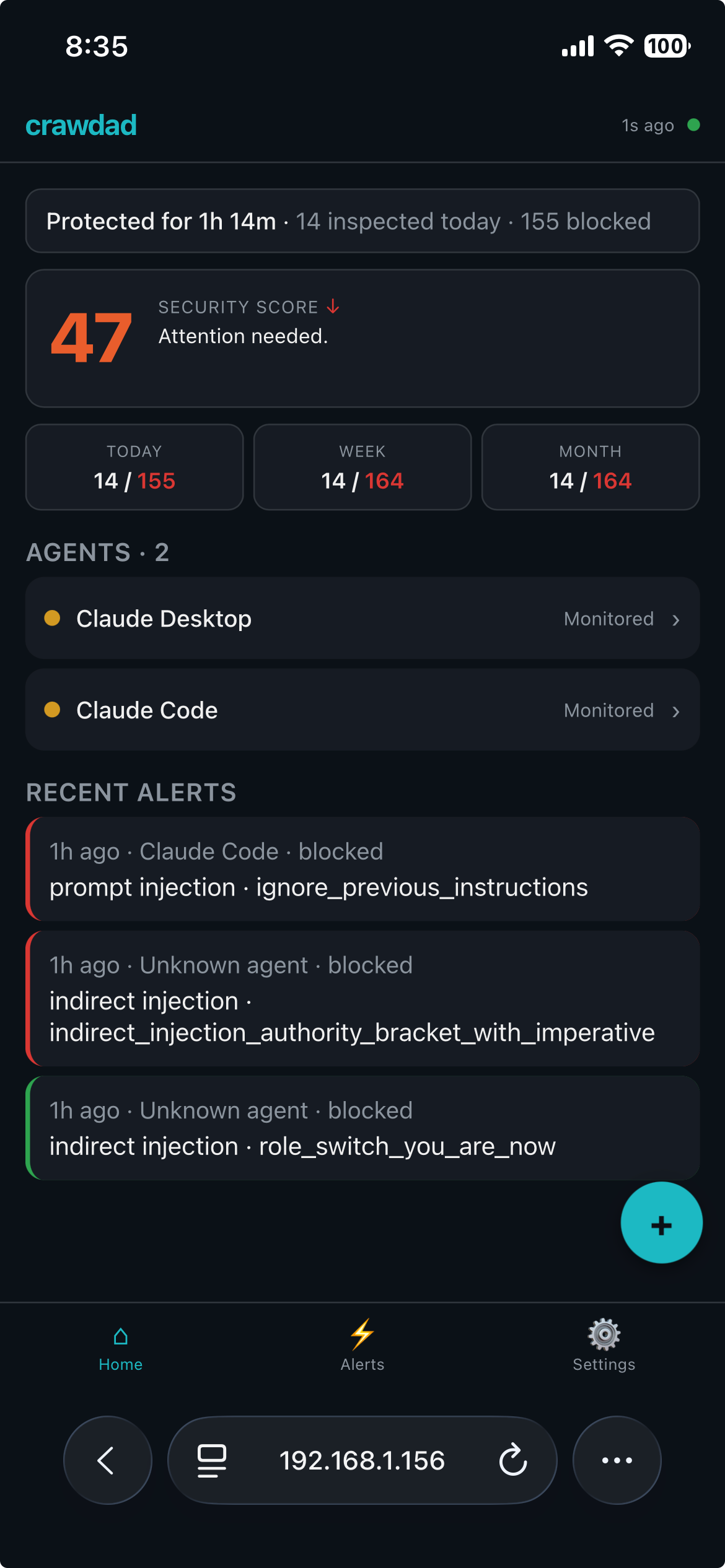
- Home: one-line health bar (uptime, requests inspected today, blocked today), big 0–100 security score with tappable sub-score breakdown (trust posture / detection health / alert hygiene) and trend arrow, three-up activity stats (Today / Week / Month), and per-agent trust-level dots.
- Alerts: severity / agent / category filter chips, per-alert Acknowledge / Quarantine / Investigate buttons. Investigate shows only detection metadata (time, agent, category, pattern, severity, verdict), never content. Mark-all-read clears unread.
- Agent detail: tap an agent to see a 24-hour activity sparkline, tool usage chips, behavioral-status line, and the full four-level trust selector.
- Quick actions (FAB): Run Test Battery fires the 24-payload adversarial spectrum and surfaces results in your alert feed. Pause All Agents is one-tap fleet quarantine for emergencies, with a confirm dialog.
- Settings: notification preferences (severity threshold, per-agent mute toggles, quiet hours, all stored on the phone; the sidecar never sees them). Privacy toggle Anonymize tool names maps real tool names to six generic buckets (
file_read,file_write,shell,web,api_call,other) in the remote state snapshot.
Every remote command is Ed25519-signed by the paired device and replay-protected on the sidecar. The relay sees encrypted blobs only, prompts, responses, tool calls, and PII stay on your machine by default. Per-device rate limits (5 trust changes / 10 min, 1 quarantine release / hour), an optional PIN gate for sensitive actions, and a desktop-side kill switch round out the safety rails.
Supported platforms
See the full system requirements — footprint, latency, and everything you need to install and connect.
| Platform | ML layer | Notes |
|---|---|---|
| macOS ARM64 (Apple Silicon) | Auto | Signed + notarized. ML downloads in the background on first run. |
| Linux x86_64 | Auto | ML downloads in the background on first run. |
| Linux ARM64 | Auto | ML downloads in the background on first run. |
| macOS x86_64 (Intel) | Pattern-only | Upstream ONNX Runtime has no 1.24+ x86_64-apple-darwin wheel; returns when one ships. |
| Windows x86_64 | Pattern-only (monitoring-first) | Native Windows provides pattern detection and visibility; full ML detection is in progress. Under Enforce mode Windows applies the mandatory credential broker but has no OS egress lock today. Use WSL for full ML detection today. |
The production scan path runs at 99.8% detection and 0.09% false-positive rate (1/1,172) on the open 497-attack / 1,172-negative benchmark at contemporary-agent-attacks (CC-BY 4.0, reproducible by any third party). The stack is: pattern layers (L1 + semantic heuristics + indirect injection + session context + PII) plus a fine-tuned DeBERTa-small ML classifier (FP32, ~568 MB, auto-downloaded). Operators can set CRAWDAD_ML_BLOCK=0 for pattern-only mode with no ML blocking.
Data directory
Crawdad creates its data directory with 0700 permissions on first run. The sidecar refuses to start on a group- or world-accessible path, this is defense-in-depth for the on-device guarantee that raw content stays local.
| Platform | Path |
|---|---|
| macOS | ~/Library/Application Support/crawdad/ |
| Linux | ~/.local/share/crawdad/ (or $XDG_DATA_HOME/crawdad/) |
| Windows | %APPDATA%\crawdad\ |
Docker deployment
For servers, use the one-command Docker setup:
curl -fsSL https://getcrawdad.dev/deploy/setup.sh | bash
See the full cloud deployment guide.
Integration
No SDK or code change is needed. Crawdad integrates transparently via environment variables, point your agent's base URL at the local proxy port and every request flows through the detection pipeline:
# Anthropic (Claude Code, Anthropic SDK)
export ANTHROPIC_BASE_URL=http://localhost:7748

# OpenAI (GPT, OpenAI SDK) — /v1 required
export OPENAI_BASE_URL=http://localhost:7747/v1

# Google (Gemini, ADK)
export GOOGLE_API_ENDPOINT=http://localhost:7746
Works with any client that respects a base URL override: Claude Code, the Anthropic and OpenAI Python/Node SDKs, Google ADK, xAI, and NVIDIA NIM.
Troubleshooting
The terminal shell doesn't see /usr/local/bin in $PATH. Close and reopen the terminal, or run export PATH="/usr/local/bin:$PATH".
The sidecar isn't running. macOS: launchctl load ~/Library/LaunchAgents/com.crawdad.sidecar.plist. Linux: sudo systemctl start crawdad-sidecar.service.
The 0700 permission check failed. Fix the path perms, then restart: chmod 700 ~/Library/Application\ Support/crawdad/ (macOS) or chmod 700 ~/.local/share/crawdad/ (Linux).
On Linux, the systemd unit write to /etc/systemd/system/ requires it. On macOS, writing the binary to /usr/local/bin may also require it unless that directory is already user-owned (common with Homebrew).
ML inference runs on macOS ARM64, Linux x86_64, and Linux ARM64 once the background model download has completed and the sidecar has been restarted. The combined stack achieves 99.80% detection with 0.09% false-positive rate (1/1,172) on the open 497-attack / 1,172-negative benchmark. Operators can disable ML block entirely via CRAWDAD_ML_BLOCK=0 for pure pattern-only mode, or suppress the download with CRAWDAD_ML_DISABLED=1.
R2 CDN is slow from your network. Kill the install and retry. If the problem persists, email contact@getcrawdad.dev.